Heya, just wanted to say I love the tool, Ive got a ton of use and fun out of it. I was wondering if you had any plans to allow favoriting specific pallets? Don't mean to push any unrequested feedback or suggestions but I was curious if that was maybe already planned :D
Feedback is strongly requested! >w< I have it in plans! Right now I'm trying to have the batch texture import to work! But maybe I'll manage to have it done in the next update too >:3
Alright since feedback is requested, I do have a couple more niche questions, if you don't mind.
Importing multiple textures and maybe exporting them all with a prefix/different directory with the same name would be pretty convenient, but you already mentioned that here and in other comments :p
Saving brightness/exposure/contrast/etc as a default / saved config would be convenient, probably a little niche tho.
When loading all the palettes with the palette+ downloaded the program does lag/freeze very briefly even with a decently beefy pc, I HATE to backseat dev especially since I dont know the inner workings of the program but if you don't mind me making some minor assumptions, maybe wrapping the loading of palettes into an async task to help with the brief freeze could help, and caching them during runtime if you dont already might prevent it from lagging on subsequent loads although that would be choosing to be a biiit more memory heavy.
I'd like to emphasize again that I love the program and its helped me a ton, these are just minor requests/nitpicky features
haha, I saw that the palettes were lagging >< I already have a fix ready, but I wait to have the bulk import done, since I don't want to spam updates that frequently as it's having annoying to download a new version to every little tweak I make. The preset save stuff is also on my list, but I think that I'll start implementing it once I'll have the steam version ready. (Btw don't worry, I'll give a free key to anyone who bought the program on itch before >w<!) Thank you so much for the feedback! I want for pixelizer to be the best as it possibly can, and I really appreciate all of the comments!
Sadly not yet!! I'll try to add an ability to load multiple ones or to be able to select some main folder and it will try to look for any pngs in there. Look forward to today's/tomorrows update! TY >w<
Hey Puck! Just wanted to thank you for the hard work you put into this program. Really helpful for getting quality conversions and previews for demakes and low poly/pixel art enthusiasts. Also, before I forget, Happy Birthday! Have a cake on me, hope you have a great one!🎂😁
I'm running into an issue where it's not producing perfect pixels. images always have pixels that are too big. And resizing the image to be the correct size distorts everything
would be neat if you could have a palette be generated from the colors of the texture you imported. basically just reducing the number of colors used in the image via a slider without having to select a palette.
Thank puck for the update! The small screen was driving me crazy xD It's a bit buggy still, it'd be awesome if the full screen button worked properly, but the ability to resize it at all is very much appreciated. Thank you.
Hi, Thanks for your tool! Its really handy as a standalone app and a timesaver. Any chance you can add full screen for the model preview or ability to detach as its own window? That would be the number one value add for me!
I could see the enthusiasm with the mouse movement in the changelog gif XD. Thanks again, looking forward to 3d preview being resizable in the future too :)
Works great on M1 Max, MacOS 26.3, with a small issue with the scroll inside sections. If I scroll too much, the elements are moved outside the area (like there's no max/min value) . I also second the comment below - please allow the app to resize. I'm using a 32in monitor and the app barealy fills 1/4 of the screen
Later edit- If I click and drag i can smoothly move the palettes. If I use the scroll wheel, it jumps/scrolls a large value
You gotta choose a palette then set it to 0% (if you don't want it) otherwise it doesn't register that you have tried to change anything because, yeah, you haven't used a preset that it needs to function xD
Loving this so far! It's an awesome tool. Any chance we can get the Dithering Strength to show its number too? Like Pixelation Size and Palette Impact do.
It would also be great if we can bulk-export textures with the same settings applied. For example, my assets all have one texture, but many alternate versions for different color palettes. I only need to preview on one of the versions but would love to be able to export all of them at once
Hi! You should be able to export all of them! The 1.04 update added an export all/apply to all button! When you press apply to all and then export all and choose your export folder, everything should work! ^^ Good idea with the dithering value! I totally missed it, I was placing all of the options by hand since it's in unity x3
Hi! I've added the dithering strenght number in v1.07! As for choosing many textures, sadly you can't yet! You can export any of them already loaded, but to actually load them in bulk, you would have to get them into a separate materials attached to the model. I'm working on adding the ability to choose multiple files during texture import!
Bro This tool is so good! By the time i used it plenty of times for my side-3D projects. I've never thoght that i would have this pixelizer in my inventory. Great investment in modeling business. Totally recommended by me. If you wonder to buy this...just do it. This program is worth more than almost 10$. Greetings from Poland BOBER!
I'm on Windows 11 and nothing works :( i can't load any model or texture. I managed to load the model as .glb file but it doesnt manage to get the texture in the material (despite having it and being able to load it in any other program). Even just trying to simply go with "load texture" does nothing and i tried many .png files.
;_; I'm really sorry it work this way! :< I don't have windows 11 yet, but today I will be uploading a big update which somewhat changes the loading script for the models and textures. Please reach out to me after the release on discord @puszke We'll try to work something out!
Thank you! And don't worry, no pressure, I'll be patient about the tool, I know you're still polishing it so do not feel like you have to fix everything in one day. I will reach out to you if it keeps malfunctioning but no bad feelings on my side, I know you're doing what you can already 🦎
Hey! I'm getting this bug where if you import a texture without a model the texture preview renders blank but it still exports the pixelated version of the texture. Makes it harder to see how my texture looks without having to export every single time i make a change
anyone having problem with their models not changing the moment you drag sliders like in videos and gifs? i have to press apply every time to make a change.
Hi! I was actually spamming S in the video XD There was an instant change function, but it was laggy on textures like 2048x2048 in size. I learned how to scale down the base texture, so instead of just applying a pixelate effect on the original image, it actually scales it down. It shouuld be enough to implement the instant change option! I'll try to make this update tomorrow or in 2 days! Sorry for the inconvenience :C
You have to select a palette, but you can change its impact to 0 so it won't affect the texture!! I'll definitely will add an option to skip the palette part!
Love the fbx import. It is still rough around the edges and figerung out that s is not safe but apply took some time. I would be cool to dial down the sensitiviy of the viewport in 3D as I zoom around. Or to get presets of some default angles.
Will it work through Wine on Linux and/or Crossover on mac? I don’t own a Windows computer but I’ve been looking for a tool like that outside of Substance Painter
Hi! I haven't tested it yet on linudx, but I do own a macbook, so I'll try to include a mac version! It's an Unity app so it shoooould work on wine, but I'm not 100% sure. I'll ask around my friends to check!
Hi, good work, like how easy to use program is. Would be great to have ability to apply palette to multiple materials at once, also list of "favorite" palette would be nice.
Hello thank you for nice soft, want to let you know that palette doubles like berry-nebula.hex \ berry-nebula(1).hex. Also are you planning to add window resize and search bar for pallets, pls?
Hi! Yep! I had the search option but it bugged out before the release ;_; It's probably the first thing I need to fix before adding new stuff! Sadly, since it's just in unity, it'll be hard for me to make it freely resizeabe, but I'll do what I can!
← Return to tool
Comments
Log in with itch.io to leave a comment.
any chance at a demo version in the future before purchase?
just got the tool and love the results! our game will be thankful for the work you did!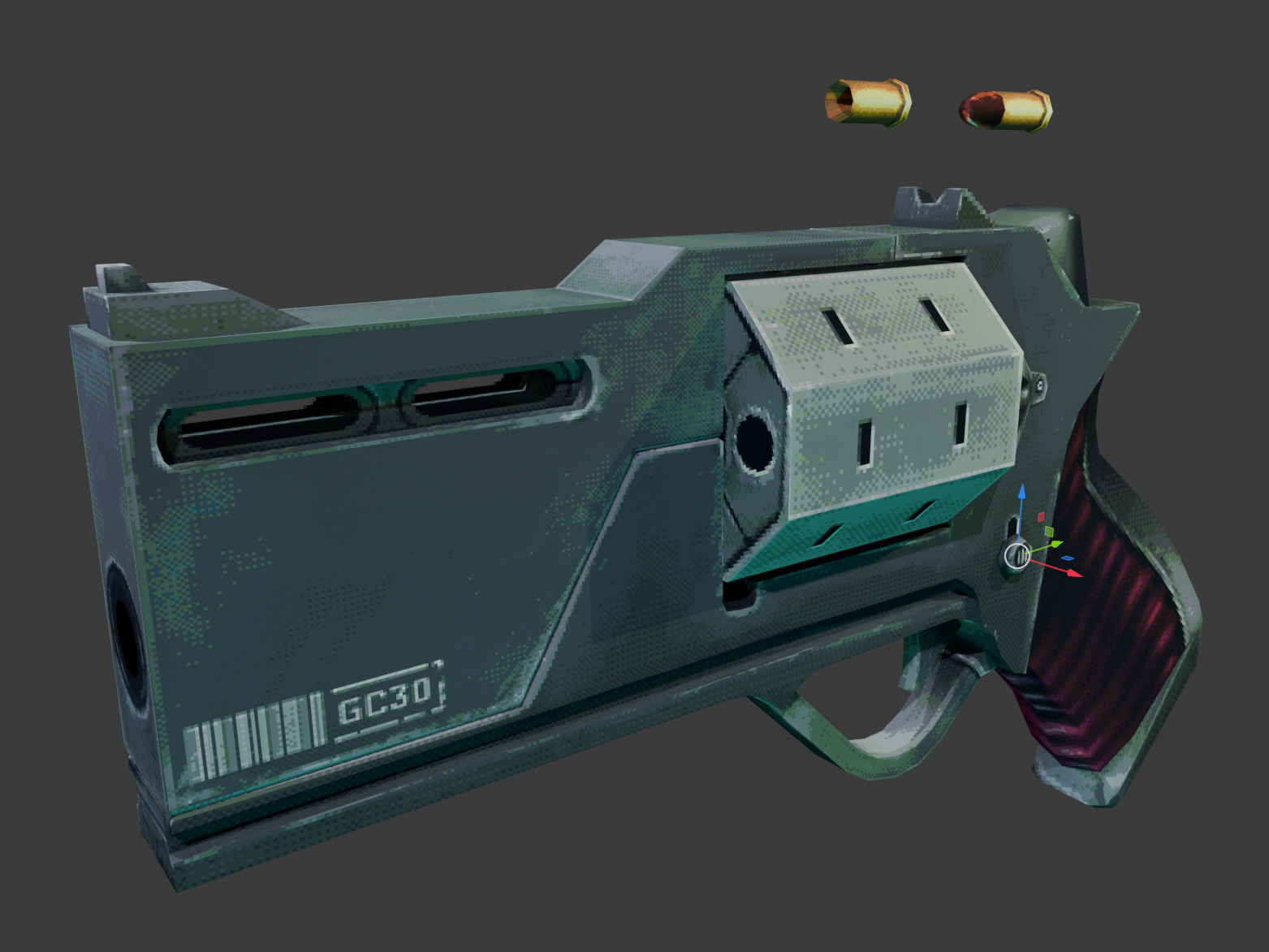
Nice >:3 the model looks amazing >O<!!
Heya, just wanted to say I love the tool, Ive got a ton of use and fun out of it. I was wondering if you had any plans to allow favoriting specific pallets? Don't mean to push any unrequested feedback or suggestions but I was curious if that was maybe already planned :D
Feedback is strongly requested! >w< I have it in plans! Right now I'm trying to have the batch texture import to work! But maybe I'll manage to have it done in the next update too >:3
Alright since feedback is requested, I do have a couple more niche questions, if you don't mind.
Importing multiple textures and maybe exporting them all with a prefix/different directory with the same name would be pretty convenient, but you already mentioned that here and in other comments :p
Saving brightness/exposure/contrast/etc as a default / saved config would be convenient, probably a little niche tho.
When loading all the palettes with the palette+ downloaded the program does lag/freeze very briefly even with a decently beefy pc, I HATE to backseat dev especially since I dont know the inner workings of the program but if you don't mind me making some minor assumptions,
maybe wrapping the loading of palettes into an async task to help with the brief freeze could help, and caching them during runtime if you dont already might prevent it from lagging on subsequent loads although that would be choosing to be a biiit more memory heavy.I'd like to emphasize again that I love the program and its helped me a ton, these are just minor requests/nitpicky features
haha, I saw that the palettes were lagging >< I already have a fix ready, but I wait to have the bulk import done, since I don't want to spam updates that frequently as it's having annoying to download a new version to every little tweak I make. The preset save stuff is also on my list, but I think that I'll start implementing it once I'll have the steam version ready. (Btw don't worry, I'll give a free key to anyone who bought the program on itch before >w<!) Thank you so much for the feedback! I want for pixelizer to be the best as it possibly can, and I really appreciate all of the comments!
Love the dedication <3 don't push yourself too much :3 lovely hearing about an upcoming steam version :D
Can you run a batch of textures via the command line once you're happy with a "profile"? This looks amazing and Happy Birthday :)
Sadly not yet!! I'll try to add an ability to load multiple ones or to be able to select some main folder and it will try to look for any pngs in there. Look forward to today's/tomorrows update! TY >w<
Thank you for your reply. I'll keep an eye on it :)
Hey Puck! Just wanted to thank you for the hard work you put into this program. Really helpful for getting quality conversions and previews for demakes and low poly/pixel art enthusiasts. Also, before I forget, Happy Birthday! Have a cake on me, hope you have a great one!🎂😁
Thank you <3
I'm running into an issue where it's not producing perfect pixels. images always have pixels that are too big. And resizing the image to be the correct size distorts everything
Hi! Could you show me some screenshots or a video of it!? :O I don't think I've encountered this before!
This is the image that is output. The pixels are 3x3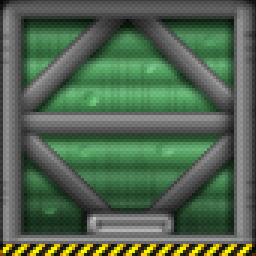
Hmm, looks rather strange :O What happens when you try to set the pixelation to 2 or less?
would be neat if you could have a palette be generated from the colors of the texture you imported. basically just reducing the number of colors used in the image via a slider without having to select a palette.
yes this whould be a great idea
Hi! I'm working on it >;3
Thank puck for the update! The small screen was driving me crazy xD It's a bit buggy still, it'd be awesome if the full screen button worked properly, but the ability to resize it at all is very much appreciated. Thank you.
Hi, Thanks for your tool! Its really handy as a standalone app and a timesaver. Any chance you can add full screen for the model preview or ability to detach as its own window? That would be the number one value add for me!
Hi! You can look forward to todays update >:3!! I'll try to release a resizable version soon!! ><
I could see the enthusiasm with the mouse movement in the changelog gif XD. Thanks again, looking forward to 3d preview being resizable in the future too :)
Overpriced tool
Fullscreen option would be cool
Got it!! >:3 You can check out the new update!
its AMAZING but it will be INSANE if there is an option to create custom palette
There is! You can put it in the data/streamingassets/palettes folder as a .hex file!
Works great on M1 Max, MacOS 26.3, with a small issue with the scroll inside sections. If I scroll too much, the elements are moved outside the area (like there's no max/min value) . I also second the comment below - please allow the app to resize. I'm using a 32in monitor and the app barealy fills 1/4 of the screen
Later edit- If I click and drag i can smoothly move the palettes. If I use the scroll wheel, it jumps/scrolls a large value
SUPER AWESOMES!! :3 [JESTER BY MECHAYUNE AND TSUNECLOUD !]
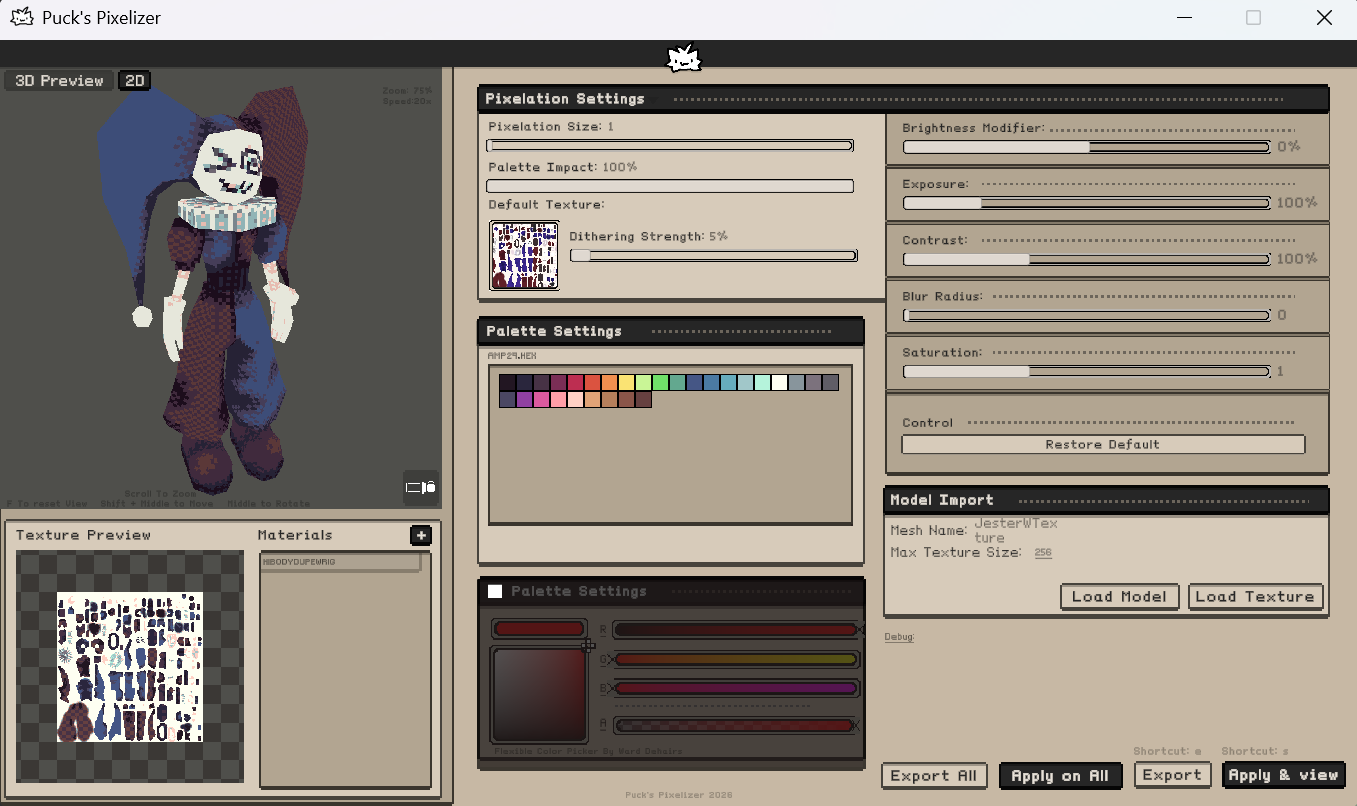
hello the pixelation isnt showing up on the models even though i have been hitting apply all
Hi! Try to select a palette first!
You gotta choose a palette then set it to 0% (if you don't want it) otherwise it doesn't register that you have tried to change anything because, yeah, you haven't used a preset that it needs to function xD
Is there any way to full screen? It's quite hard to see what I'm doing.
The tool is really useful though!
Will be there a Mac version?
What is the palette size limitation? pixatool was limited to around 192 or so, can this do a full 256 palette?
There's no limit to the palette size! I mean, it would probably lag a bit on some bigger palettes, but eventually it should shade it.
thank you for the answer! that's perfect, as I generally build stuff with a set .pal file in mind!
new to linux, any chance for a native linux build?
Working on it!
Nice! I might have to get it myself once you have that sorted out
Oh cool! I'll keep an eye out for it! Can't wait :D
Loving this so far! It's an awesome tool. Any chance we can get the Dithering Strength to show its number too? Like Pixelation Size and Palette Impact do.
It would also be great if we can bulk-export textures with the same settings applied. For example, my assets all have one texture, but many alternate versions for different color palettes. I only need to preview on one of the versions but would love to be able to export all of them at once
Hi! You should be able to export all of them! The 1.04 update added an export all/apply to all button! When you press apply to all and then export all and choose your export folder, everything should work! ^^ Good idea with the dithering value! I totally missed it, I was placing all of the options by hand since it's in unity x3
Oh really? How do I get multiple textures selected than?
Hi! I've added the dithering strenght number in v1.07! As for choosing many textures, sadly you can't yet! You can export any of them already loaded, but to actually load them in bulk, you would have to get them into a separate materials attached to the model. I'm working on adding the ability to choose multiple files during texture import!
anyone tried running this with wine?
haven't tried wine directly but am running it via the itch app on mint and it works just fine
hey im pretty sure it just uses your system Wine so yeah
hi i cant get this to load my FBx at all nothing happens
Hi! What windows are you using? And does the fbx have all of it's materials on export?
windows 11, it's a 3d model FBX exported from unreal
Check out the new update! it should work now! :3
New update is awesome! Will there be a option to add custom palettes in the future?
It's avaliable right now! Check data/streamingassets/palettes folder! You can paste an..hex file there and it should load as a new palette!
Thanks again!
Bro This tool is so good! By the time i used it plenty of times for my side-3D projects. I've never thoght that i would have this pixelizer in my inventory. Great investment in modeling business. Totally recommended by me. If you wonder to buy this...just do it. This program is worth more than almost 10$. Greetings from Poland BOBER!
Ty!!
I'm on Windows 11 and nothing works :( i can't load any model or texture. I managed to load the model as .glb file but it doesnt manage to get the texture in the material (despite having it and being able to load it in any other program). Even just trying to simply go with "load texture" does nothing and i tried many .png files.
;_; I'm really sorry it work this way! :< I don't have windows 11 yet, but today I will be uploading a big update which somewhat changes the loading script for the models and textures. Please reach out to me after the release on discord @puszke We'll try to work something out!
Thank you! And don't worry, no pressure, I'll be patient about the tool, I know you're still polishing it so do not feel like you have to fix everything in one day. I will reach out to you if it keeps malfunctioning but no bad feelings on my side, I know you're doing what you can already 🦎
Hi! This looks really cool, but I'm curious: does it have more than one dithering option?
Hi! It does only contain a one dithering option at the moment!!
dude i'm using this for my next project for sure! this looks fantastic :3
Thank you!! <3
Hey! I'm getting this bug where if you import a texture without a model the texture preview renders blank but it still exports the pixelated version of the texture. Makes it harder to see how my texture looks without having to export every single time i make a change
Hi! I plan to add a standalone texture import/export mode in the future update! It should resolve any current issues! :3
ucupaint + this, is literally substance painter + pixel8r
anyone having problem with their models not changing the moment you drag sliders like in videos and gifs? i have to press apply every time to make a change.
Hi! I was actually spamming S in the video XD There was an instant change function, but it was laggy on textures like 2048x2048 in size. I learned how to scale down the base texture, so instead of just applying a pixelate effect on the original image, it actually scales it down. It shouuld be enough to implement the instant change option! I'll try to make this update tomorrow or in 2 days! Sorry for the inconvenience :C
no worries here. beforehand, I actually thought that you must be spamming apply but then I just couldn't stop myself from asking in any case.
btw, is it possible to pixelate and other things without selecting palette?
You have to select a palette, but you can change its impact to 0 so it won't affect the texture!! I'll definitely will add an option to skip the palette part!
Love the fbx import. It is still rough around the edges and figerung out that s is not safe but apply took some time. I would be cool to dial down the sensitiviy of the viewport in 3D as I zoom around. Or to get presets of some default angles.
Overall great tool! Loving it so far
Absolutely need this! Thanks, Puck!! uwu
But they still need a Lowpoly Model for that ✌🏻
The model can be highpoly. The program itself uses model only to lookup how the texture will look on it, so it can have any poly count!
Will it work through Wine on Linux and/or Crossover on mac? I don’t own a Windows computer but I’ve been looking for a tool like that outside of Substance Painter
Hi! I haven't tested it yet on linudx, but I do own a macbook, so I'll try to include a mac version! It's an Unity app so it shoooould work on wine, but I'm not 100% sure. I'll ask around my friends to check!
Thanks a lot! That would be great. The fact that it’s a Unity app makes it very promising. Kudos on the release!
Awesome. When mac version is released I’m buying it immediately!
Ive read it works great through Wine, Im down to get it myself at some point
Hi, good work, like how easy to use program is. Would be great to have ability to apply palette to multiple materials at once, also list of "favorite" palette would be nice.
Thank you!! ^^ Both of these are a must have in future updates!!
Hello thank you for nice soft, want to let you know that palette doubles like berry-nebula.hex \ berry-nebula(1).hex. Also are you planning to add window resize and search bar for pallets, pls?
Hi! Yep! I had the search option but it bugged out before the release ;_; It's probably the first thing I need to fix before adding new stuff! Sadly, since it's just in unity, it'll be hard for me to make it freely resizeabe, but I'll do what I can!
im broke can i have i for free
Absolute pixelization